

Appearance
Playlists Overview
A playlist lets you group multiple videos together so viewers can watch them in sequence like a course, a series, or a collection. Viewers can switch between videos seamlessly without ever leaving the page.
Pro feature
Playlists require Fluent Player Pro. The free version displays the Playlists menu, but you must upgrade to Pro to create and embed playlists on your site.
What Is a Playlist?
A playlist is a collection of Fluent Player media items displayed together in a single player interface. You simply create your media items first under Fluent Player → Media, and then group them together into a structured playlist.
Each playlist contains:
- A title for internal organization (e.g., "WordPress Basics Course").
- A list of media items arranged in your preferred playback order.
- A specialized layout that controls how the collection displays on the front end.
- A unique ID used to easily embed the playlist anywhere on your site.
Why Use Playlists?
- Online Courses: Organize lessons in a strict step-by-step order with built-in progress tracking.
- Tutorial Series: Allow viewers to watch related guides and walkthroughs sequentially.
- Product Demos: Group all relevant product feature videos together in one central hub.
- Video Libraries: Display a massive video catalog with columns, pagination, and search options.
Playlist Layouts
FluentPlayer Pro offers two layout styles:
- Standard: A video player with a playlist sidebar showing thumbnails. Good for series, tutorials, and courses.
- Grid: Displays videos in a multi column thumbnail grid. Good for large libraries and catalogs.
Learn more in Playlist Layouts.
Where to Manage Playlists
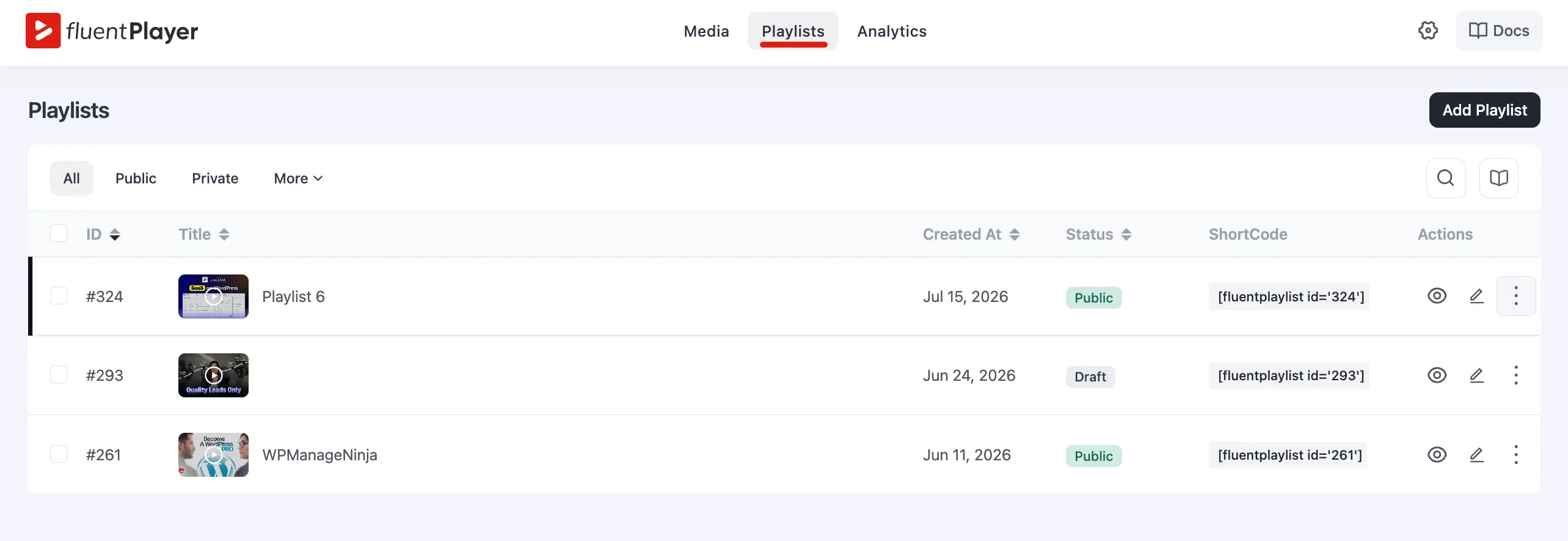
Navigate to Fluent Player → Playlists in your WordPress admin sidebar. From this central dashboard, you can:
- Create new video playlists from scratch.
- Add, remove, or drag-and-drop to reorder media items.
- Select your layout style and fine-tune its specific display options.
- Delete old playlists you no longer need on your site.
The Playlists Overview hub provides the perfect foundation for organizing multiple video files into high-converting collections